10-Rep Learning ~ Teague's Tech Treks

Learning Technology & Tech Observations by Dr. Helen Teague

By

Weekend Ed. Quote ~ April 10

“Today belongs to the engineers and technicians who touched this machine, and it does, and their work was good.” ~ Amit Kshatriya, NASA Associate Administrator, April 10, 2026 

We celebrate the successful splash down of the Artemis II Orion capsule Friday night!

Artemis II Splash Down

Photo shared by Beth ODell

Context of the Quote:

  • Mission: Artemis II, which concluded with a splashdown of the Orion capsule in the Pacific Ocean at 5:07pm, Pacific Time.
  • Significance: Acting NASA administrator Sean Duffy announced the selection of Kshatriya as associate administrator in a statement on September 3, 2025. Kshatriya’s quote was meant to honor the welders at Michoud, technicians at Kennedy Space Center, and Engineers who built and prepared the Orion spacecraft and SLS rocket.
  • Supporting Quote: “The path to the lunar surface is open, but the work ahead is greater than the work behind us,” Kshatriya added, looking forward to the future Artemis III mission. 
  • In Your Classroom: Consider presenting and discussing this quote with your students.
  • STEAM curriculum options: Using your favorite Search Engine. Here is one link with STEAM-Artemis resource options- https://duckduckgo.com/?q=STEAM+curriculum+for+Artemis+II&t=iphone&ia=web

                                                                               References

Edwards, B. (2026, April 10). Artemis II astronauts splash down after NASA moon flyby. Florida Today. https://www.floridatoday.com/story/tech/science/space/2026/04/10/artemis-ii-astronauts-splash-down-after-nasas-mission-around-the-moon/89524026007/

Archived Link: https://web.archive.org/web/20260411212343/https://www.floridatoday.com/story/tech/science/space/2026/04/10/artemis-ii-astronauts-splash-down-after-nasas-mission-around-the-moon/89524026007/


More Weekend Ed. Quotes

#GCUTEC544 #GCUTEC595 #GCUTEC516
#CUNE604, #CUNE605 #CUNE603

By

Artemis II Astronaut Christina Koch

Christina Koch was a firefighter at the South Pole at -111°F before she ever applied to be an astronaut.

NASA Astronaut Christina Koch

That was maybe the fourth most interesting line on her resume. Christina Koch grew up in North Carolina, earned three degrees from NC State, and her first real job was building deep-space instruments at NASA.
Then she left for Antarctica and spent three and a half years bouncing between the Arctic and Antarctic as a research scientist, including a full winter at the South Pole base. Winter at the South Pole means going months without sunlight or fresh food, with a crew of about 50 people and no way out until flights resume. While she was at the South Pole, she also joined the glacier search-and-rescue team.

After returning from the South Pole, she went to Johns Hopkins and built instruments for two NASA missions (one of them is still orbiting Jupiter right now). Christina Koch figured out how to start a tiny vacuum pump that NASA designed for a future Mars rover. Johns Hopkins nominated it for their Invention of the Year in 2009. Then she went back to the field. More time in Antarctica and a stretch up in Greenland. A government research station in northern Alaska, near the top of the world. Then she ran another one in American Samoa, near the equator. In 2013, NASA selected her from 6,300 applicants. Eight people got in. Her first space mission was supposed to be a normal rotation on the International Space Station, but NASA extended it. She ended up staying 328 straight days and orbiting Earth 5,248 times, covering about 139 million miles (roughly 291 round trips to the Moon). Up there, she ran over 210 experiments, including tests of cancer drugs in zero gravity and 3D printers that can build structures close to human tissue. Six spacewalks, 42 hours floating outside the station. She learned Russian for the training. She flies supersonic jets. Right now, Koch is on Artemis II, heading for a flyby behind the far side of the Moon. The crew launched on April 1 and is on track to travel about 252,000 miles from Earth, which would break the all-time human distance record of 248,655 miles set by Apollo 13 in 1970. That record has stood for 56 years, and it was set during a disaster that nearly killed the crew. Fred Haise, one of the Apollo 13 astronauts, is 92 now. He told Koch: “I heard you’re going to break our record.” Nobody had left Earth’s neighborhood since December 1972. Koch and her three crewmates are the first in 53 years, and they are coming home at about 25,000 mph. That is faster than any crewed spacecraft has ever come back through the atmosphere.

Image Source: https://x.com/anishmoonka/status/2040192369002184966?s=43&t=WPc6_-lleO_FubhB07bVhA

By

Weekend Ed. Quote ~ February 6 2026

“Challenges are opportunities in disguise.”
~ Dr. Gladys West, Mathematician & Pioneer in GPS technology


     Dr. West provided significant contributions to mathematical modeling of the shape of the Earth and her work on the development of satellite geodesy models which were later incorporated into the Global Positioning System (GPS).[1]

     Dr. West also participated in an award-winning study that proved the regularity of Pluto‘s motion relative to Neptune

     At age 70 years, Dr. West completed her Ph.D. in Public Administration through Distance Learning. 

Dr. Gladys West – October 27, 1930 – January 17, 2026 (aged 95)


Read more about the work and innovations of Dr. Gladys West from the Library of Congress at this link: https://findingaids.loc.gov/repositories/19/resources/6417   

#STEM


More Weekend Ed. Quotes

#GCUTEC544 #GCUTEC595 #GCUTEC516
#CUNE604, #CUNE605 #CUNE603

By

Computational Thinking Activity Examples in STEAM

Computational Thinking Activity Examples in STEAM

Art and Computational Thinking rendered by Loveart

Artistic Image Rendered by Loveart


Computational Thinking…at the ECE and Primary Grade Level, the key is Teacher Modeling! Also, keeping the computational tools simple enough that younger Students can focus on creative expression while experiencing how technology expands their artistic possibilities. Each example maintains age-appropriate complexity while introducing Students how computational processes can enhance and transform their creative work!

Examples: Drawing and Models
Kinesthetic Materials such as Flannel cut-outs, popsicle sticks, clay, PlayDoh, can be used to create models, dioramas, and settings from their drawing blueprints.

Tools Programs like Scratch Jr., Geogebra, Tynker, or even simple drawing apps let students create digital art and animations. They can make characters move, change colors, or respond to clicks—combining their drawings with basic coding concepts.

Physical Computing Projects Students can use tools like Makey Makey to turn their drawings or sculptures into interactive pieces. For example, they might paint with conductive paint and create circuits that light up or make sounds when touched. This connects traditional art making with simple electronics.

Digital Collage and Photo Editing Even basic photo editing tools or collage apps let students manipulate images in ways that would be impossible with scissors and glue—changing colors, duplicating elements, adding filters, or layering images.

Music and Sound Creation Apps like GarageBand or Chrome Music Lab allow students to compose music computationally, experimenting with loops, beats, and digital instruments. They can create soundscapes to accompany visual art or storytelling.

Pixel Art and Grid-Based Design Pixel art naturally introduces concepts like patterns, symmetry, and coordinates. Students can create designs on graph paper and then translate them into digital formats, or use apps specifically designed for pixel art.

Stop-Motion Animation Using tablets or computers with simple stop-motion apps, students can animate their clay sculptures, drawings, or found objects—learning about sequencing and how many small changes create movement.

Pattern Generation and Tessellations Students can use simple coding blocks or pattern-making apps to create repeating designs and Tessellations. They might program shapes to rotate, flip, or change colors in systematic ways, exploring mathematical concepts like symmetry and repetition while creating visually striking artwork. Tools like Scratch or even Google Sheets can be used to generate complex patterns from simple rules.

Digital Storytelling with Branching Narratives Students can create interactive stories where readers make choices that affect the outcome. Using platforms like Scratch, Twine, or Book Creator, they combine their writing, illustrations, and basic programming to create “choose your own adventure” style narratives. The computational element is in designing the story’s logic and multiple pathways.

Light Painting and Long-Exposure Photography Students can use tablets or cameras with long-exposure settings to “paint” with light sources in dark spaces. They can plan their designs, experiment with different movements, and see how the camera’s computational processing captures their motion over time in ways the human eye cannot—blending performance art with digital photography.

Computational Poetry and Text Manipulation Students can use simple code or apps to manipulate text in creative ways—generating poems from word lists, creating acrostics automatically, rearranging words based on rules they design, or even making “word clouds” that visualize the frequency of words in their writing. This combines language arts with algorithmic thinking to create visual-textual art.


Computational Thinking…at the Secondary Grade Level, Students can also engage more deeply with the conceptual aspects of computational art: exploring questions about authorship, the relationship between artist and algorithm, digital culture, and how computation changes artistic practice itself. Secondary students can engage with more sophisticated computationally enhanced art practices.


Examples: Coding-Based Visual Art Students can use Processing, p5.js, or similar creative coding platforms to generate visual art through code. They might create generative art that produces unique patterns, interactive animations, or data visualizations that transform information into aesthetic expressions.

3D Modeling and Digital Sculpture Tools like Blender, Tinkercad, or SketchUp allow students to create three-dimensional digital sculptures and environments. These can be rendered as images, animated, or even prepared for 3D printing to bridge digital and physical art forms.

Game Design as Artistic Expression Using Unity, Unreal Engine, or more accessible platforms like Construct or GameMaker, students can create narrative-driven or experimental games that explore themes, emotions, and ideas—treating the game itself as an art object rather than just entertainment.

AI-Assisted Art Creation Students can experiment with AI image generators, style transfer algorithms, or machine learning tools to create hybrid works. They might train models on their own artwork, explore ethical questions about AI authorship, or use AI as a collaborative partner in the creative process.

Interactive Installations and Physical Computing Arduino or Raspberry Pi projects let students create installations that respond to viewers through sensors, motors, lights, and sound. For example, an artwork that changes based on proximity, environmental data, or audience interaction.

Digital Photography and Computational Imaging Beyond basic editing, students can explore HDR imaging, photogrammetry (creating 3D models from photographs), glitch art, or algorithmic manipulation of images to create surreal or abstract compositions.

Web-Based and Net Art Students can create interactive websites as art pieces using HTML, CSS, and JavaScript—exploring how browsers, hyperlinks, and digital navigation can become artistic mediums.

Music Production and Sound Design Digital audio workstations (DAWs) like Ableton, FL Studio, or free options like Audacity enable students to compose, manipulate, and layer sounds. They might create electronic music, soundscapes, or experimental audio art.

Motion Graphics and Video Art Tools like After Effects, Premiere Pro, or open-source alternatives allow students to create animated typography, video collages, or time-based digital art that combines moving images with computational effects.

Data Art and Visualization Students can transform datasets—whether personal, social, or environmental—into visual or interactive artworks that communicate information aesthetically, using tools like Tableau, D3.js, or custom code.


By

Using Recent Research and Cross-Cutting Skills for Your Instructional Practice

Learning does not need to be confined to boundaries and barriers.

Sometimes graduate students indicate that featured research in courses is not specifically applicable to their specific instructional practice, subject area, and/or grade level. This view seems to encourage a templated, one-size-fits-all-Lesson-Plans approach.

Learning is not confined to boundaries and barriers.

     A review of Piaget’s adaptation, assimilation, and accommodation process (1954, 1956, 1965), is an important reminder that learning does not need to be confined to boundaries and barriers.


Another important concept is the application of research to STEAM / STEM instructional practices using Crosscutting and Transferable skills, which are a key objective of the NGSS Crosscutting concepts.

This video expands the definition of Crosscutting concept to unifying ideas that apply across different STEAM/STEM subjects and general content disciplines. Crosscutting concepts and application skills help students make connections among subject-matter silos. They provide connections between research and instructional practice. Crosscutting concepts and Transferable skills fuse knowledge, develop deeper understanding, and personalize ideas to prior knowledge.

This video will show how to make connections between research and practice in three easy steps. (There are more steps, just three are included in this video.)


1 Video Transcript_Application of Current Research

VideoVersion_EnhancingGrade5ScienceProcessSkillsinEarthScience_AFoundationForDesigningInquiryBasedSTEAMLearningPacket


                                                                References

Lindayao, N. G., Salic-Hairulla, M. A., Dinoro, A. P., Ellare, A. O., & Madale, V. A. (2025). Enhancing Grade 5 Science Process Skills in Earth Science: A Foundation for Designing an Inquiry-Based STEAM Learning Packet. International Journal of Research and Innovation in Social Science9(4), 6277-6287.

Piaget, J. (1954). The Construction of Reality in the Child. New York: Basic Books.

Piaget, J. (1956; 1965). The Origins of Intelligence in Children. International Universities Press Inc. 

Teague, H. (2025). Application of Current Research & Cross-Cutting Skills to Your Instructional Practice. [Video.]. Loom. https://www.loom.com/share/f4d678c4ee0a42869218a98c98aaa199?sid=42540bc4-7145-4129-9efd-3d4861454896


By

STEAM meets Literacy through Novel Connections

A traditional written summary benefits from recasting with an objective, adaptive literary analysis.
The following re-focused, written outline reflects STEAM components.


“The Little Prince” reflects STEAM learning through the following connections:
Science: “The Little Prince” includes a planet-hopping journey, which can be used to introduce concepts like planetary orbits, different climates, and the unique characteristics of various planets. Students can research different planets and their characteristics, creating models or presentations about them. The little prince’s asteroid (B-612) can be explored as a learning opportunity for understanding the solar system and the classification of celestial bodies. 

Technology:
The lamplighter’s lamp, which is essential for the planet, can be explored as an example of a technological invention that provides light and keeps the planet running. 

The fox’s communication with the little prince can be analyzed as a form of early technology, or a concept of telecommunication that was used before modern forms of technology. 

Engineering: The little prince’s asteroid can be used as a case study of sustainable engineering. Students can research different methods of resource management and how they can be applied to his small planet. The lamplighter’s lamp can be explored as a simple engineering design, and students can create their own models or designs of the lamp. 

Mathematics: The Little Prince mentions the little prince’s planet B-612, which can be used as a starting point for mathematical exploration. Students can create diagrams or models of the planet and its layout, or use it as an example for understanding spatial reasoning. The Little Prince can be used to introduce mathematical concepts like fractions or ratios, especially when discussing the different types of baobab trees and their impact on the planet. 

Art: The illustrations in the The Little Prince can be used as a starting point for artistic exploration. Students can recreate the illustrations or create their own interpretations of the story’s characters and settings. The story of The Little Prince can be used as a source of inspiration for creating different art forms, such as paintings, sculptures, or digital art. 

Language Arts: The plot of The Little Prince can be used to explore themes of friendship, responsibility, and the importance of seeing beyond surface appearances. Students can engage in creative writing activities inspired by the story, such as writing their own poems, stories, or plays. The book’s language and imagery can be explored as a source of inspiration for creative writing.

By

Weekend Ed. Quote ~ March 7

“Look at that view!” ~ Firefly Aerospace Engineer, January 15, 2025


Blue Ghost Landed on Sunday, March 2, 2025 ~ Link to post: https://4oops.edublogs.org/2025/03/02/blue-ghost-from-firefly-aerospace-lands-on-the-moon/


More Weekend Ed. Quotes

#GCUTEC544 #GCUTEC595 #GCUTEC516 #GCUTEC521
#CUNE604, #CUNE605

By

Blue Ghost and first Sunrise on the Moon


More Info: Sunrises on the Moon are slow and dramatic, taking about 2 Earth days to fully rise. Since a lunar day lasts ~29.5 Earth days, the Sun stays up for ~14 days before a long, cold night begins. Until then, enjoy the warmth!

#CUNE604

By

Weekend Ed. Quote ~ August 23

“Implementing STEAM education in classrooms can be enhanced by incorporating other methods to bring students flexibility during learning, such as the engineering design process (EDP) and hybrid learning.” ~Pasttita Ayu Laksmiwati, Zsolt Lavicza, Adi Nur Cahyono, Mara Alagic, and Filiz Mumcu

EngineeringFields by Helen Teague


References

Laksmiwati, P. A., Lavicza, Z., Cahyono, A. N., Alagic, M., & Mumcu, F. (2024). When engineering design meets STEAM education in hybrid learning
environment: teachers’ innovation key through design heuristics. Asia Pacific Journal of Education, 1-19.


More Weekend Ed. Quotes

#GCUTEC544 #GCUTEC595 #GCUTEC516 #GCUTEC521
#CUNE604, #CUNE605

By

Weekend Ed. Quote ~ April 26

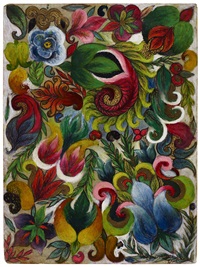
“Something told me to draw or die. It was shown to me what I should do.” ~ Minnie Evans, Artist, folk art

Minnie Evans, untitled

Minnie Evans, Untitled


Quoting Source: Perry, R. A. (1992). Free within ourselves: African-American Artists in the Collection of the National Museum of American Art. National Museum of American Art in Association with Pomegranate Art Books.

Image Source: artnet.com/WebServices/images/ll00058lldDD3JFgUNECfDrCWQFHPKcEpjG/minnie-evans-untitled.jpg


More Weekend Ed. Quotes

#GCUTEC544 #GCUTEC595 #GCUTEC516 #GCUTEC521
#CUNE604, #CUNE605

Skip to toolbar